
Restaurant billing, digital queue and pickup operations
Restaurant billing, digital queues and pickup orders—from one Outlet workspace.
QwikPass is browser-based restaurant operations software for India, connecting anonymous guest turns, counter bills, staff-confirmed payments, private digital invoices, preparation and food-ready updates.
Looking for a restaurant? Find participating outletsIllustrative product flowOne connected visit
Guest turn
Q-018
Private live pass created
No guest account or phone number requiredFrom arrival to collection
One workflow for the queue, counter and kitchen.
QwikPass does not force every guest into a digital line and does not replace the restaurant’s payment account. It connects the service steps the outlet chooses to run.
- 01
Guest joins or walks in
A digital turn is optional. Direct walk-ins continue through the same counter.
- 02
Staff manages the real wait
The outlet handles digital turns and records current walk-in conditions for better estimates.
- 03
Cashier creates the bill
Items come from the outlet menu. A guest name or mobile number remains optional.
- 04
Restaurant confirms payment
The guest pays the restaurant. QwikPass records the staff confirmation and issues the invoice.
- 05
Kitchen marks food ready
The order moves through queued, preparing, ready and collected only when staff updates it.
30-second product film
See how one restaurant visit stays connected.
From an anonymous guest turn to counter billing, preparation and collection—this is the QwikPass operating model in motion.
Keep your place without creating an account.
Find a participating outlet, take a private QwikPass and see when to head back. The live pass remains the source of truth even when browser alerts are off.
- No app download
- No phone number required to join
- Live approach, called and ready states
Bill digital turns and direct walk-ins at the same counter.
Use the outlet menu, confirm the customer’s chosen restaurant payment method, issue the invoice and send paid orders to preparation.
- Optional guest name and number
- Outlet-controlled menu and invoice fields
- Queued, preparing, ready and collected
Current Outlet workspace
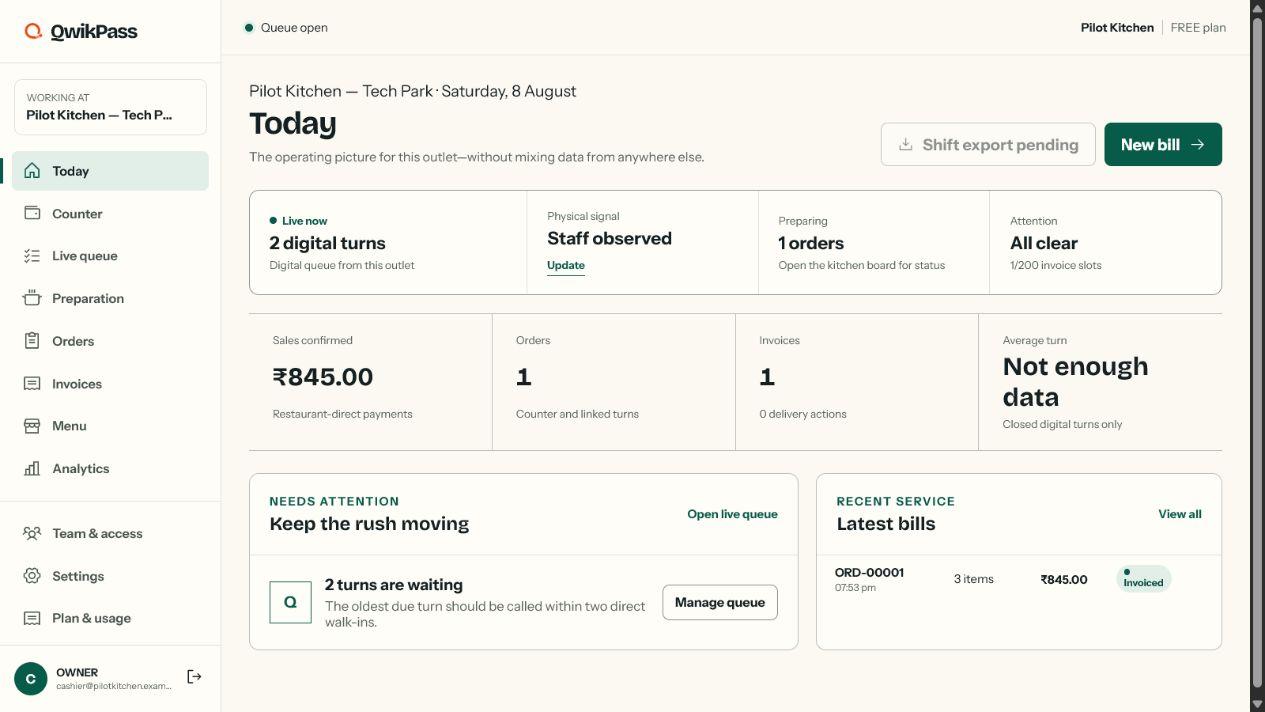
The outlet team sees the operating picture—not another marketing dashboard.
Queue state, walk-in conditions, preparation, daily invoice usage and recent service stay together in the Outlet workspace. The image shows the current QwikPass demo environment.
Restaurant-direct payments
QwikPass records the sale. It does not take the restaurant’s counter payment.
Guests pay the restaurant through its enabled cash, UPI, card or other counter method. Online-order money uses the restaurant’s connected Razorpay account when enabled. Staff confirms counter receipt before QwikPass issues the invoice.
- QwikPass does not independently verify counter receipt
- QwikPass service-credit purchases and restaurant order money stay separate
- Invoice data comes from restaurant-supplied seller, tax and item settings
- The restaurant remains responsible for statutory and tax accuracy
Access by organization, outlet and role
Staff see only what they are assigned.
A cashier mapped to one outlet does not automatically see another outlet, organization settings or analytics. Owners assign roles, permissions and explicit denials.
Open Access capacity
Use the restaurant tools. Add prepaid capacity only when it is needed.
All Outlets share one 300-credit monthly Organization pool for completed billing/pickup operations and WhatsApp updates.
₹0no subscription
Pro-level restaurant tools · up to 10 configured Outlets
25 named users · no card required6,000operations at zero message use
5 credits cover 100 completed operations, from the shared 300-credit pool
A pickup order and its invoice count once300WhatsApp messages at zero operation use
1 credit per transactional invoice or order update, from the same pool
Email, PDF and private live pages remain available₹0.40per credit before tax
20 extra operations or 1 transactional WhatsApp update
250-credit minimum · lifetime validity · non-refundableNo subscription or postpaid overageOnly verified one-time purchases add service-wallet value. Work pauses safely when no included or prepaid capacity remains.
Enterprise rollout
Prove the operating impact at one Outlet before planning wider deployment.
A defined first deployment can measure what happens from join to collection, then scope governance, integrations, support and rollout requirements from evidence.
Illustrative pilot simulation100 accepted turns · 2-hour lunch service2 counter staff · 6-minute base preparation time. These figures are operating targets—not measured customer results.
Clear before you start
Questions restaurants and guests ask first.
No invented savings, no hidden payment flow and no requirement that every walk-in joins digitally.
Do guests need an app or account?
No. A guest can join a participating outlet from the browser and keep a private live pass on that device.
Is a mobile number mandatory?
No. It is optional for a counter bill. A number and the appropriate choice or consent are needed only when the guest requests WhatsApp or SMS delivery.
Does QwikPass collect restaurant payments?
No. Counter payments use the outlet’s enabled cash, UPI, card or other method. QwikPass records the staff confirmation; it does not process or independently verify that counter payment.
What about guests who never join QwikPass?
They are served normally. Staff can record current in-store demand so digital wait ranges reflect conditions beyond the digital queue.
What counts as a queue journey, and how do the limits work?
One queue journey is counted only when a guest is successfully admitted to an Outlet’s digital line and receives a private pass. Reopening or refreshing that pass—and staff moving it through approach, called, arrived or served—does not create another journey. The active-pass limit is separate: it controls how many unfinished digital turns can exist at once, and a place becomes available when a turn is served, missed or cancelled. Monthly journeys are counted per Outlet and reset with the plan month; ordinary walk-ins are not counted unless they join the digital queue. Invoice allowances and WhatsApp invoice/order-update credits use separate counters. Starting a bill reserves one invoice slot for 20 minutes; cancelling it or letting it expire releases that slot.
What happens when the included credit pool is used?
The Organization shares 300 service credits each month across all Outlets. Five credits cover 100 completed billing or pickup operations; one WhatsApp invoice or order update uses one credit. After the pool is used, prepaid service credits can fund more use; without them, the applicable new action pauses safely while existing records remain available.
Do issued invoices disappear when the month resets?
No. The monthly issue counter resets; issued invoice records remain in the restaurant’s protected history and are not routinely auto-deleted.
How are WhatsApp and SMS updates counted?
WhatsApp invoices and order updates use one credit each from the same Organization-wide 300-credit monthly pool as billing/pickup operations. After that, prepaid service credits can cover them. Marketing remains unavailable on the shared QwikPass sender. Private live pages, invoice viewing, PDF download and email use no WhatsApp credit; SMS is priced separately.
Can a cashier see another outlet or analytics?
Not automatically. Staff access follows the outlet, role, permissions and explicit denials assigned by the organization owner.
Start with one Outlet
Set up the menu, staff and invoice once—then run the real shift.
Create the Organization, add the legal Business and Outlet, import or build the menu, configure invoice fields and assign staff before publishing.